LinkStation Series Firmware Version 1.74
Thank you for using the LinkStation Series.
This software updates LS-XHL, LS-CHL, LS-WXL, LS-WSXL, LS-SL, LS-AVL, LS-VL, LS-WVL, LS-QVL, LS-XL, LS-YL, LS-WXBL series firmware to version 1.74. If your firmware is already version 1.74 or later and the LinkStation is not in EM mode, you do not need this update.
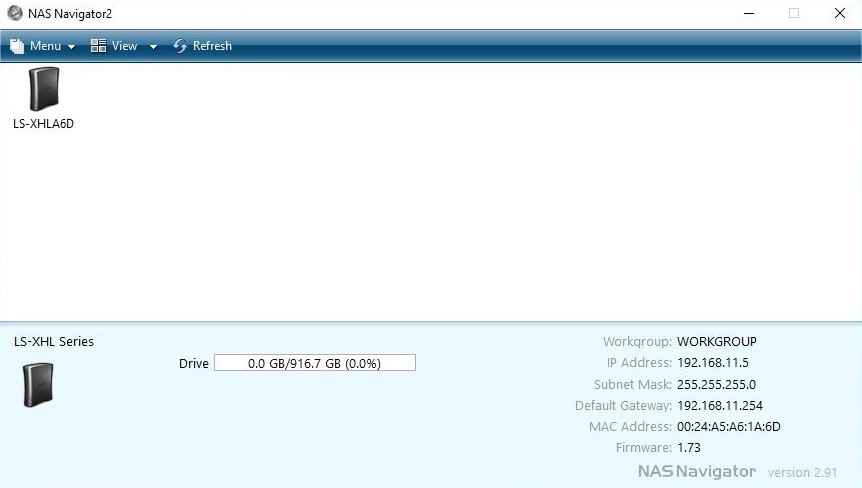
[How to Check Your Firmware Version]
Select your LinkStation from the NAS Navigator2 window. The firmware version is displayed in the bottom of right corner of the screen.
[How to Check if Your LinkStation is in EM Mode]
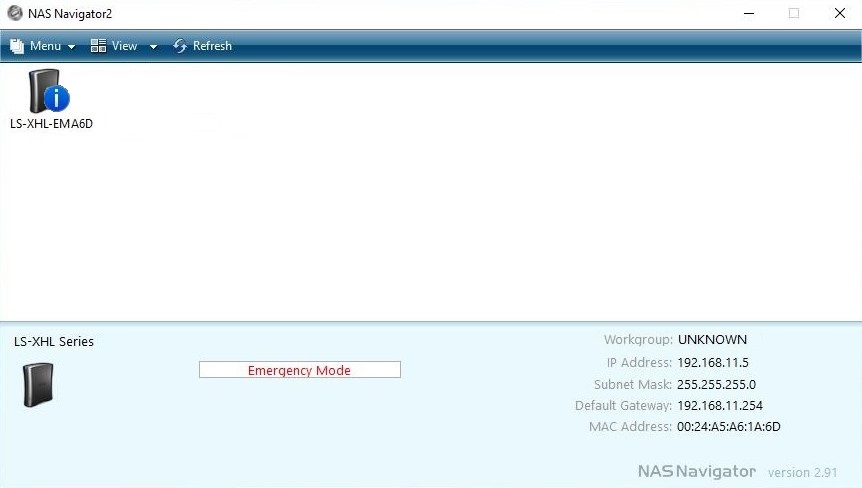
Select your LinkStation from the NAS Navigator2 window. If your unit's name or capacity's progress bar shows "EM mode", your unit is in EM mode.
In this case, firmware version is not displayed.
Read the following instructions before updating.
1. Model
LS-XHL, LS-CHL, LS-WXL, LS-WSXL, LS-SL, LS-AVL, LS-VL, LS-WVL, LS-QVL, LS-XL, LS-YL, LS-WXBL Series
2. OS
Windows XP, Windows Vista (32-bit, 64-bit), Windows 7 (32-bit, 64-bit), Windows 8 (32-bit, 64-bit), Windows 8.1 (32-bit, 64-bit), Windows 10 (32-bit, 64-bit)
Note: Mac OS is not supported.
3. How to Update
- Connect the LinkStation to the computer that will run the updater, and make sure both devices are on the same network subnet. The subnet masks should be the same and the first three numbers of the IP addresses should be the same. The last number of the IP addresses should be different.
For example, if the IP address / subnet mask of the computer is
"192.168.0.10 / 255.255.255.0"
and the IP address / subnet mask of the LinkStation is
"192.168.1.150 / 255.255.255.0",
then they will not work together properly.
In such a case, reconfigure the values for the LinkStation to
" 192.168.0.150 / 255.255.255.0 "
- Exit all applications. Also, disable or exit any firewall software. You may resume firewall after the update is complete.
- Extract the downloaded file and run LSUpdater.exe. When a LinkStation is detected, an update window will open.
- If multiple LinkStation units are connected, select which unit to update.
- Click 'Update' and enter the LinkStation's admin password.
- Click 'OK'.
- The firmware will begin updating. The info LED will flash during the update process.
- When update is complete, a message will appear.
4. Notes
- Do not turn the unit or the hub off until the update is finished.
- The update will take several minutes. If it times out after 10 minutes or more, reboot the LinkStation and try again.
Note: If your LinkStation is in EM mode, reboot it and try again.
- Do not access your LinkStation while updating firmware.
- If the firmware update fails due to inconsistent wireless connectivity, connect your PC via a wired connection, then try again.
- Update may fail if the computer downloading the firmware has multiple network interfaces enabled. Disable any unnecessary network interfaces and try again.
- USB drives are not mounted automatically after a firmware update. Unplug and then reconnect them after the update.
2014/11/27 Buffalo Inc.